Add an in-app updater #2136
Add an in-app updater #2136
Conversation


|
It seems a lot easier to cache the commit hash as a variable and see if it matches |

|
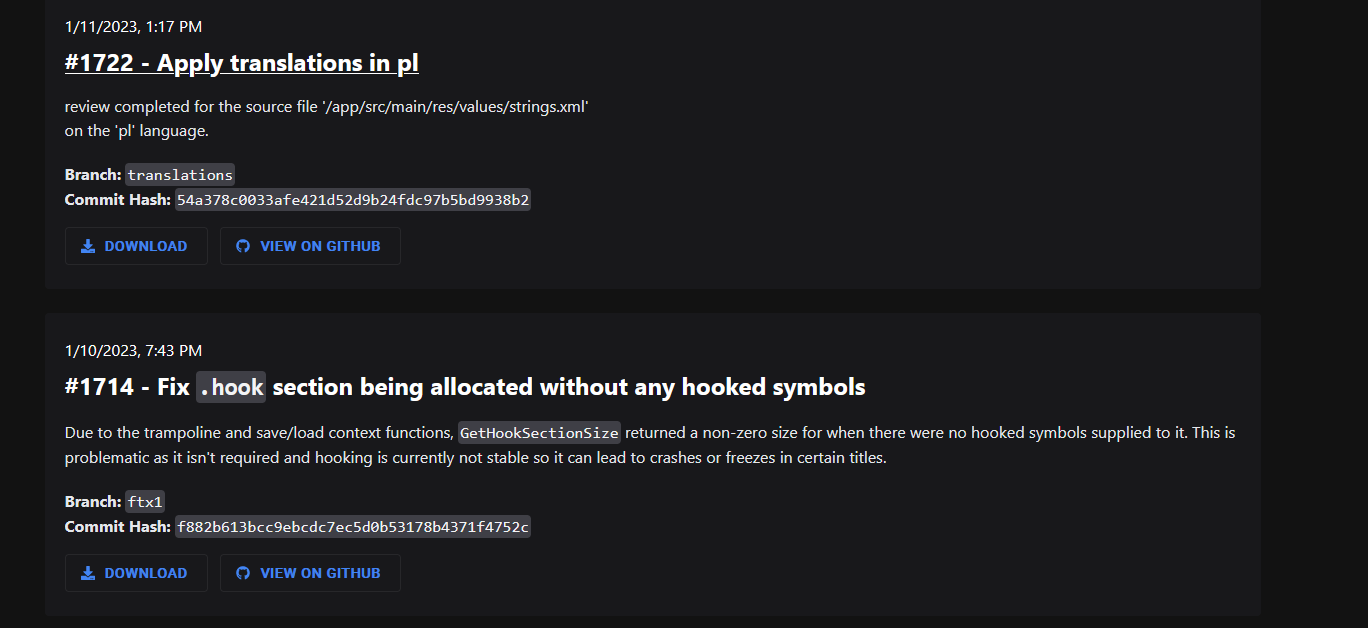
Can you add that when updater is looking for update that it will only look for ftx1 branch build, because rn it will look only latest uploaded update/apk. Example there is branch "translations" that are on several updates old ftx1 build. If is that latest update/apk then it will update to that version which is downgrade.
|

|
Hey @PabloG02 quick question regarding this in-app updater feature. How hard would you think it would be the place the regular or Edge version number under the |
Setting a default may prevent a couple false reports down the line because someone didn't change the branch. Ideally, people read things before they click them. Reality has proven that is actually the exception. |

hmm, would be awkward rn but maybe in future |


|
Do you remember when Android was all about "when comparing String values, always use x.equals(y)" and then one day, they were like "nah, just kidding. Don't do that." It was around the same time they decided that if everybody wanted to build their apps in Cordova, they would rebrand Javascript and call it a new native language. Read: Thanks for making the yellow lines go away ;) |

|
@PabloG02 Is there any reason why you use |
|
Now that |

|
Just a heads up - After 2246, you can get your badge marker with I was testing both together and I don't know about you, but I've never used MaterialYou. |
|
@lynxnb pls review |
 nickbeth
left a comment
nickbeth
left a comment
nickbeth
left a comment
There was a problem hiding this comment.
There's quite a bit of stuff to comment on here, so a few rounds of CR might be needed here.
-
You make a network request and wait for it to complete before showing the dialog. That is just calling for trouble if the network is not fast enough. What you should do here is show the dialog with a loading icon, make the request, and once the data comes in, you hide the loading icon and show the data. The network request should also be properly attached to a lifecycle so that it is aborted once the user backs out of MainActivity`.
-
You're making redundant network requests by calling
checkRemoteForUpdatesboth innotifyUpdateBadgeandcheckForUpdates. Request to the APIs should be as few as possible because they both consume data and are slow. They should be performed in a centralised way, and the result should be cached and the data reused between interactions with the updater. One request should be made when the app launches, further ones should be requested by the user with a "Check for updates" button maybe. -
Updater should be toggle-able by the user, so that it doesn't make network requests automatically, when the user doesn't want so. A simple setting should be enough.
The way you'd approach something like this is: define the base functionalities your Updater class needs to have, write the functions, then start using those functionalities and build on top of those as needed.
Ideally what you'd want to do is have a singleton Updater kind of class (object in Kotlin). This is used for making requests, caching request results (latest update available), attach callbacks that are called when updates are available, launch downloads of the latest apk, and everything else the updater needs to do.
The Updater class would remain "dormant" until checkForUpdate is called. At that point, the Updater will make an async network request and cache the result so that every future call to checkForUpdate doesn't make another network op unless the force flag is set. After that, it would notify the component that had requested the check, and the component would do its things.
|
I don't know if it will help at all, but a lot of the suggestions I have been throwing your way have been sourced from the update class I made for TagMo. It's not user enabled and it sources updates from the GitHub API. The API is very similar to the one you are sourcing in terms of content, though. How I do it might help with working out an approach. I use an interface. A single update check fires off as a listener with a callback for having an update or not having an update. That callback fills in the UI and, when appropriate, caches the URL of the download. The UI button responds to the check for if that update is found. If there is an update URL present when the user clicks the install button, it triggers the download. If not, clicking the button can check again before telling the user there are none. The reason for a second check here is on the likely chance that they are clicking the button much later into the instance or at least aware that they are firing off an update check. Here, a second check may not be necessary. I do it because we have an issue with people not installing updates until something is already broken. I also fire off an update check when collecting a log, which probably isn't required here. The reason for this one is that 90% of issues people face are because they "didn't get the memo" that it was already reported it, fixed, and included in the update they skipped. Again, this may not be something you want to do. It's just part of the process I use because we get a lot of issues reported that were already resolved. The last bit is that I cache a timestamp when the check is run. This is done so that if someone clicks the button a bunch of times in a row or comes back to the UI that triggers the check a bunch of times, it only actually checks after an hour has passed (or whatever time you set). This ensures that nobody is flooding the API request limit or wasting their own data performing a check that 99.9% of the time is useless. Maybe it will help or maybe not, but that is how I do it. |
6 participants


No description provided.