



Efficient language detector (Nito-ELD or ELD) is a fast and accurate language detector, is one of the fastest non compiled detectors, while its accuracy is within the range of the heaviest and slowest detectors.
It's 100% JavaScript (vanilla), easy installation and no dependencies.
ELD is also available in Python and PHP.
Changes from v1 to v2
You can now import static eld with a specific database size:
import { eld } from 'eld/large';For dynamic import, you have to load a database to initialize:
import { eld } from 'eld';
await eld.load('large')More clear function names (old available, but deprecated)
dynamicLangSubset()is now calledsetLanguageSubset()cleanText()is now calledenableTextCleanup()loadNgrams()is now calledload()ELD is now faster and more accurate.
- For Node.js
$ npm install eld- For Web, just download or clone the files
git clone https://github.com/nitotm/efficient-language-detector-js
Importing a static, fixed size eld database. Options: 'eld/large', 'eld/medium', 'eld/small', 'eld/extrasmall'
- At Node.js
import { eld } from 'eld/large' // use .mjs extension for version <18- At Node.js REPL
const { eld } = await import('eld/large')- At the Web Browser
<script type="module" charset="utf-8">
    import { eld } from './src/entries/static.large.js' // Update path.
    // './src/entries/dynamic.js' for dynamic eld
</script>- To load a pre-built minified version (iife), it is not a module. Included at /minified (GitHub)
<script src="minified/eld.xs.min.js" charset="utf-8"></script>If we use dynamic 'eld', we need to load() a database to initialize.
Available sizes: 'large', 'medium', 'small' & 'extrasmall'
- Node.js example (Works also with all options displayed at static import)
import { eld } from 'eld' // use .mjs extension for version <18
await eld.load('large') // Not available for static eld with preloaded databasedetect() expects a UTF-8 string, and returns an object, with a language variable, with a ISO 639-1 code or empty string
console.log( eld.detect('Hola, cómo te llamas?') )
// { language: 'es', getScores(): {'es': 0.5, 'et': 0.2}, isReliable(): true }
// returns { language: string, getScores(): Object, isReliable(): boolean }

console.log( eld.detect('Hola, cómo te llamas?').language )
// 'es'- To reduce the languages to be detected, there are 2 options, they only need to be executed once. (Check available languages below)
let languagesSubset = ['en', 'es', 'fr', 'it', 'nl', 'de']

// Option 1
// Setting setLanguageSubset(), detect() executes normally but finally filters the excluded languages
eld.setLanguageSubset(languagesSubset) // Returns an Object with the subset validated languages
// to remove the subset
eld.setLanguageSubset(false)

// Option 2 ( NOT available for static eld, with preloaded DB size )
// The optimal way to regularly use the same subset, is using saveSubset() to download a new database
eld.saveSubset(languagesSubset) // ONLY for the Web Browser
// We can load any Ngrams database saved at src/ngrams/, including subsets. Returns true if success
await eld.load('medium')
// eld.load('file').then((loaded) => { if (loaded) { } })- Also, we can get the current status of eld: languages, database type and subset
console.log( eld.info() )Build and minify static size example, with esbuild + terser. With npm package installed:
npx esbuild --bundle --format=esm eld/large --outfile=eld.large.js
terser eld.large.js --compress --mangle --output eld.large.min.js
Using folder path:
npx esbuild --bundle --format=esm src/entries/static.large.js > eld.large.js
For non-module iife browser scripts:
npx esbuild --bundle --format=iife --global-name=__eld_module src/entries/static.extrasmall.js > eld.xs.js --footer:js="globalThis.eld = __eld_module.default;"
For a client side solution, I included at /minified (GitHub) an iife bundle file size XS, which still performs great for sentences.
The XS version weights 940kb, when gzipped it's only 264kb.
I compared ELD with a different variety of detectors.
| URL | Version | Language |
|---|---|---|
| https://github.com/nitotm/efficient-language-detector-js/ | 2.0.0 | Javascript |
| https://github.com/nitotm/efficient-language-detector/ | 1.0.0 | PHP |
| https://github.com/pemistahl/lingua-py | 1.3.2 | Python |
| https://github.com/CLD2Owners/cld2 | Aug 21, 2015 | C++ |
| https://github.com/google/cld3 | Aug 28, 2020 | C++ |
| https://github.com/wooorm/franc | 6.1.0 | Javascript |
Benchmarks: Tweets: 760KB, short sentences of 140 chars max.; Big test: 10MB, sentences in all 60 languages supported; Sentences: 8MB, this is the Lingua sentences test, minus unsupported languages.
Short sentences is what ELD and most detectors focus on, as very short text is unreliable, but I included the Lingua Word pairs 1.5MB, and Single words 880KB tests to see how they all compare beyond their reliable limits.
These are the results, first, accuracy and then execution time.
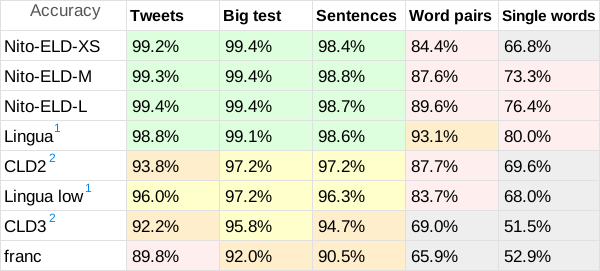
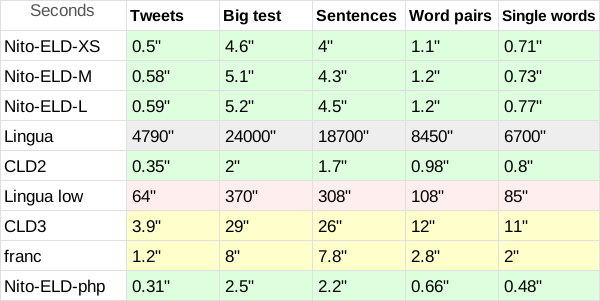
1. Lingua could have a small advantage as it participates with 54 languages, 6 less.
2. CLD2 and CLD3, return a list of languages, the ones not included in this test where discarded, but usually they return one language, I believe they have a disadvantage.
Also, I confirm the results of CLD2 for short text are correct, contrary to the test on the Lingua page, they did not use the parameter "bestEffort = True", their benchmark for CLD2 is unfair.
The RAM memory usage for each DB size is XS: 37MB, S: 54MB, M: 71MB, L: 138MB.
These are the ISO 639-1 codes of the 60 supported languages for Nito-ELD v1
'am', 'ar', 'az', 'be', 'bg', 'bn', 'ca', 'cs', 'da', 'de', 'el', 'en', 'es', 'et', 'eu', 'fa', 'fi', 'fr', 'gu', 'he', 'hi', 'hr', 'hu', 'hy', 'is', 'it', 'ja', 'ka', 'kn', 'ko', 'ku', 'lo', 'lt', 'lv', 'ml', 'mr', 'ms', 'nl', 'no', 'or', 'pa', 'pl', 'pt', 'ro', 'ru', 'sk', 'sl', 'sq', 'sr', 'sv', 'ta', 'te', 'th', 'tl', 'tr', 'uk', 'ur', 'vi', 'yo', 'zh'
Full name languages:
Amharic, Arabic, Azerbaijani (Latin), Belarusian, Bulgarian, Bengali, Catalan, Czech, Danish, German, Greek, English, Spanish, Estonian, Basque, Persian, Finnish, French, Gujarati, Hebrew, Hindi, Croatian, Hungarian, Armenian, Icelandic, Italian, Japanese, Georgian, Kannada, Korean, Kurdish (Arabic), Lao, Lithuanian, Latvian, Malayalam, Marathi, Malay (Latin), Dutch, Norwegian, Oriya, Punjabi, Polish, Portuguese, Romanian, Russian, Slovak, Slovene, Albanian, Serbian (Cyrillic), Swedish, Tamil, Telugu, Thai, Tagalog, Turkish, Ukrainian, Urdu, Vietnamese, Yoruba, Chinese
Donate / Hire
If you wish to Donate for open source improvements, Hire me for private modifications / upgrades, or to Contact me, use the following link: https://linktr.ee/nitotm
