


Proper CLI is a Python library for creating composable, nestable, and ridiculously good looking command-line-user-interfaces from simple classes.
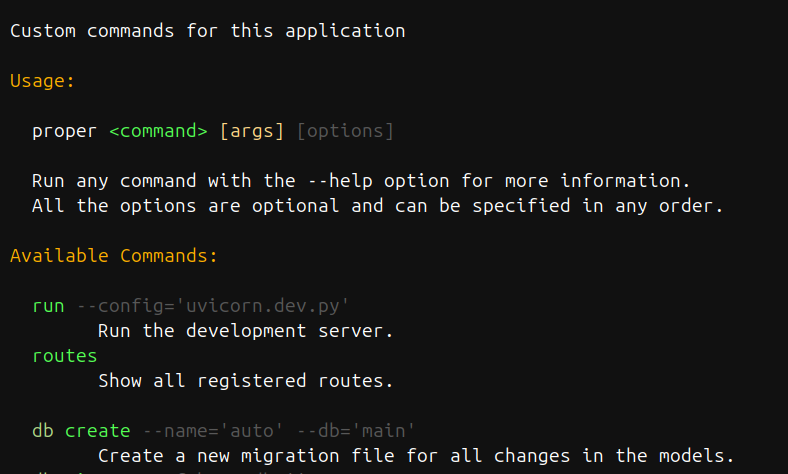
- Made for interfacing with humans.
- Arbitrary nesting and composition of commands.
- Automatic help page generation
- No need to redeclare paramaters and options with decorators, just write Python methods
- The help of a command is its docstring, why make it more complex?
Declare a class that inherits from proper_cli.Cli. Every method/attribute that does not starts with an underscore will be a command.
from proper_cli import Cli

class Manage(Cli):
    def first(self, arg1, arg2=3):
        pass

    def second(self):
        pass

    def _not_a_command(self):
        pass
Then, instance that class and call it.
# run.py
cli = Manage()

if __name__ == "__main__":
    cli()
The class dosctring will be printed at the beginning of the help page.
The arguments can be then passed by position:
python run.py first foo baror by name:
python run.py first -arg1 foo -arg2 barTo pass a True use the name without a value, for a False, prepend the name of the argument with no-:
python run.py first -arg1 -no-arg2If an attribute is a subclass of proper_cli.Cli, it will be a subgroup:
from proper_cli import Cli

class DBSub(Cli):
    def migrate(self):
        pass

class Manage(Cli):
    # A subgroup
db = DBSub # NOT `DBSub()`You can pass any named argument as context to be used by your commands. This will be stored at the _env attribute.
Example:
>>> cli = Manage(lorem="ipsum")
>>> print(cli._env)
{"lorem": "ipsum"}The image at the top was autogenerated by running this example:
# example.py
from proper_cli import Cli


class DBCli(Cli):
    """Database-related commands
    """

    def migrate(self, message):
        """Autogenerate a new revision file.

        This is an alias for "revision --autogenerate".

        Arguments:

        - message: Revision message

        """
        pass

    def branches(self):
        """Show all branches."""
        pass


class MyCli(Cli):
    """Welcome to Proper CLI 3
    """

    def new(self, path, quiet=False):
        """Creates a new Proper application at `path`.

        Arguments:

        - path: Where to create the new application.
        - quiet [False]: Supress all output.
        """
        pass

    def hello(count, name):
        """Simple program that greets NAME for a total of COUNT times."""
        pass

    # A subgroup!
    db = DBCli


cli = MyCli()

if __name__ == "__main__":
cli()Whenever you output text, you can surround the text with tags to color its output
This is automatically enabled for the docstrings, but you can also have it by using proper_cli.echo() as a drop-in replacement of print().
# green text
echo("<color fg:green-3>foo</color>")

# bold green text
echo("<color fg:green-3 b>foo</color>")

# black text on a cyan background
echo("<color fg:cyan-1 r>foo</color>")

# italic underlined yellow text
echo("<color fg:yellow-2 iu>foo</color>")
The available styles are: bold (b), italic (i), underline (u), strikeout (s), reverse (r), and dim (d)
The closing tag </color> revokes all formatting options established by the last opened tag.
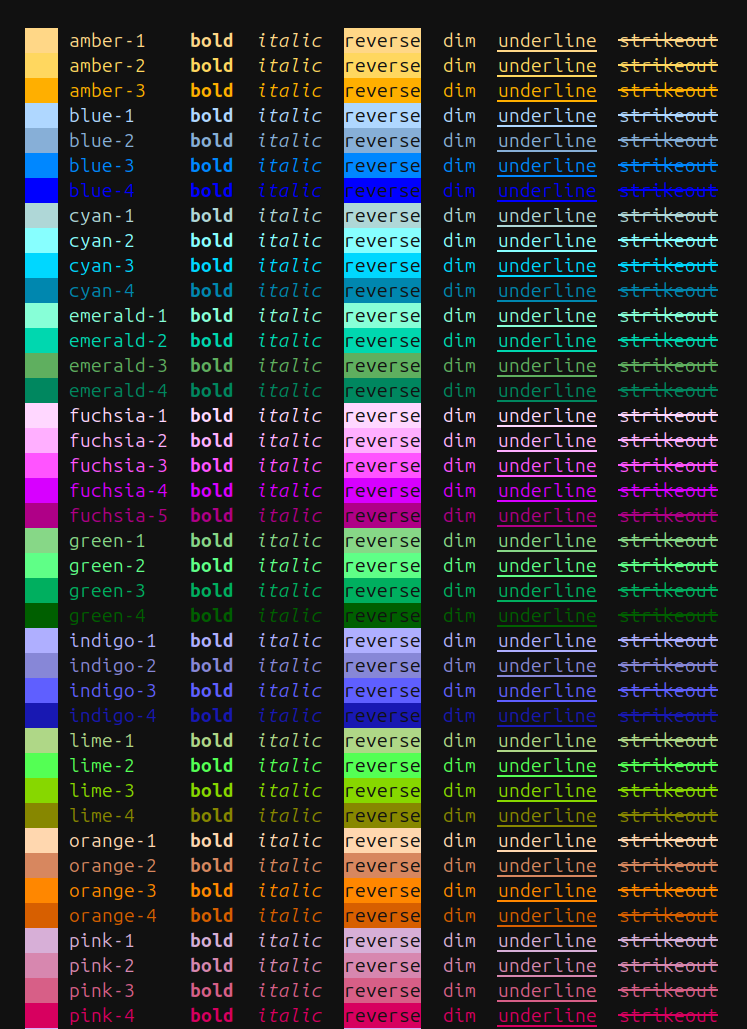
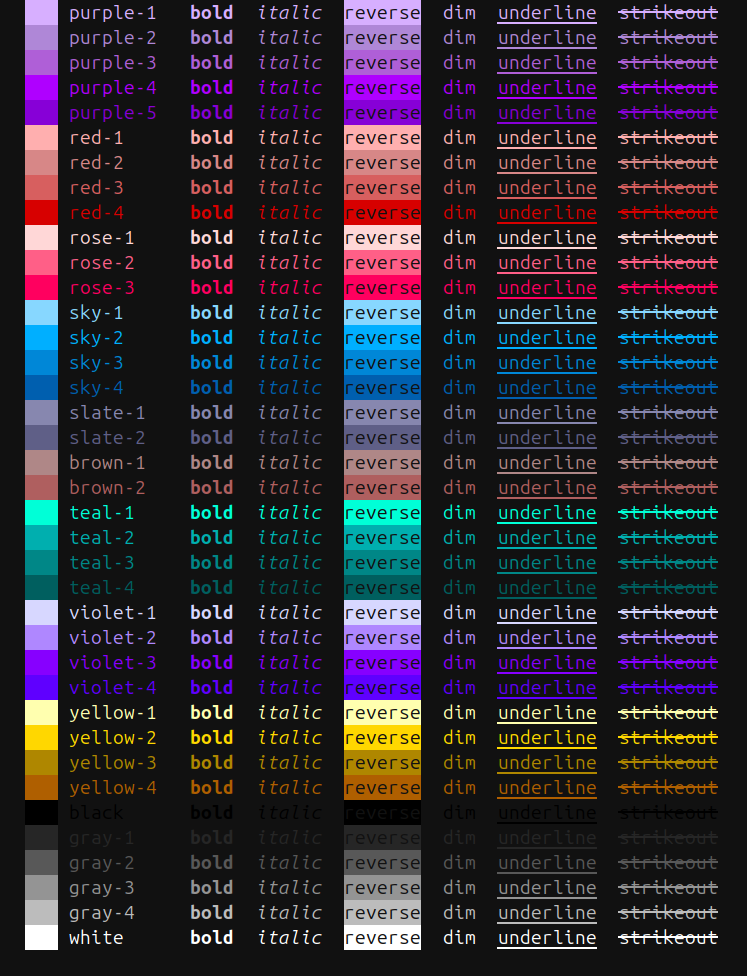
Run proper_cli/colors.py directly to preview the full palette of available colors in your terminal:
Beyond the CLI builder, proper_cli also includes some commonly-used helper functions
Ask a yes/no question via and return their answer.
Ask a question via input() and return their answer.
Everything below is importable directly from proper_cli.
Base class for a command group. Subclass it; every method and attribute whose name does not start with an underscore becomes a command (or a subgroup, if it is itself a Cli subclass).
Cli(
    *,
    parent: str = "",
    indent: str = "  ",
    initial_indent: str = " ",
    indent_start: int = 0,
    show_params: bool = True,
    colors: dict[str, str] | None = None,
    **env,
)parent: Prefix shown in the generated usage line. Set automatically fromsys.argv[0]when the instance is called.indent,initial_indent,indent_start: Control the indentation of the help page.show_params: WhenFalse, command arguments and options are omitted from the help page.colors: A dict mapping the components of the help page to color strings, i.e.:"command": "fg:lime-2".**env: Arbitrary context, stored as the_envdict and inherited by subgroups.
Calling the instance (cli()) parses sys.argv, dispatches to the matching command or subgroup, and prints the help page when no command is given or --help is passed.
I find it too verbose.
ABecause this looks better and is easier to use and understand.
Because this library fits better my mental model. I hope it matches yours as well.