Jenkins plugin to review code and run tests on Drupal.

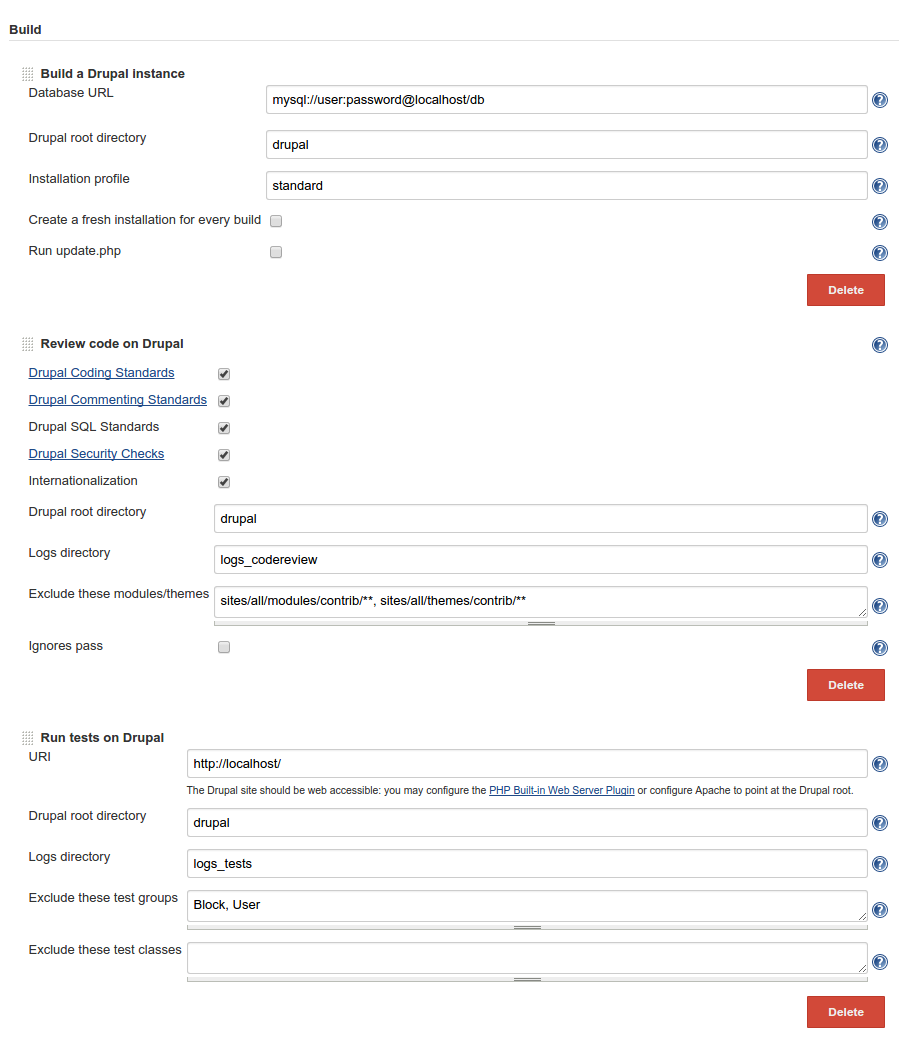
- Install drush 7+ globally or configure the path to Drush on
http://<jenkins-server>/configure - Install Checkstyle, JUnit and PHP Built-in Web Server
- Create a local database:
CREATE DATABASE db; - Create a Freestyle project that looks like this, or create a Drupal project
- Update the database URL
git clone https://github.com/jenkinsci/drupal-developer-plugincd drupal-developer-plugin/git checkout tags/drupal-developer-0.1mvn clean install -DskipTests=true
http://<jenkins-server>/pluginManager/:
- SCM API
- Checkstyle, JUnit and PHP Built-in Web Server are not required but are relevant
Either from the command line:
wget http://<jenkins-server>/jnlpJars/jenkins-cli.jarjava -jar jenkins-cli.jar -s http://<jenkins-server>/ install-plugin ./drupal-developer.hpi/etc/init.d/jenkins restart
Or from the web interface:
- Go to
http://<jenkins-server>/pluginManager/advanced - Upload
./target/drupal-developer.hpi - Restart Jenkins
CREATE DATABASE db;
git clone https://github.com/drush-ops/drush.git /var/lib/jenkins/tools/drushcd /var/libs/jenkins/tools/drushgit checkout tags/7.0.0-rc2curl -sSL https://getcomposer.org/installer | phpphp composer.phar install- Go to
http://<jenkins-server>/configure - Under
Drush installations, setPath to Drush hometo/var/lib/jenkins/tools/drush
Create a new 'Freestyle' project.
Alternatively you may create a 'Drupal' project which generates a ready-to-use job to review code and run tests on a vanilla Drupal core. If you use this option then you may skip most of the instrutions below: just update the database URL and possibly set up a web server.
Configure the Source Code Management section to fetch a full Drupal code base. Here are a few options:
- If you just want to run tests on a Drupal core, you may use Git:
- Repository:
http://git.drupal.org/project/drupal.git - Branch Specifier:
tags/7.38
- If your own code repository includes a Drupal core, then just pull it
- If it does not, then you may combine your own repo with the drupal.org repo using Multiple SCMs
- Alternatively you may use a
Drush Makefilesource
By default Jenkins pulls code into the workspace root but you might want to put Drupal into a subdirectory to keep things clean (e.g. $WORKSPACE/drupal):
- If using Git: set option
Additional Behaviours / Check out to a sub-directorytodrupal - If using Subversion: set option
Local module directorytodrupal - If using a Drush Makefile: set option
Drupal root directorytodrupal
Note that a Drush Makefile source will fetch the code every time a new build runs. Using a regular source like Git or Subversion is probably more efficient.
Also only Drupal 7 code is supported.
Some tests fail if Drupal does not run behind a web server. Here are a couple of solutions:
- Either install PHP Built-in Web Server (requires PHP >= 5.4.0) e.g.:
- Port:
8000 - Host:
localhost - Document root:
drupal(or leave empty if the Drupal root is the workspace root) - Or install Apache locally and make it point at the Drupal root (e.g.
/var/lib/jenkins/jobs/myproject/workspace/drupal)
Add build steps:
Build a Drupal instanceReview code on DrupalRun tests on Drupal
The default values should work though you need to update a few things:
- Update the database URL in step
Build a Drupal instanceto point at your database - If you have checked out Drupal into a subdirectory (e.g.
drupal) then update the Drupal root directory of every step accordingly ; otherwise, just leave it empty - The URI of step
Run tests on Drupalshould match what you have configured on your webserver (e.g.http://localhost:8000)
Note that if your code base does not include a copy of the Coder module, then step Review code on Drupal will automatically download it into $DRUPAL/modules/.
Plot Code Review results using Checkstyle:
- Create a post-build action
Publish Checkstyle analysis results - If the logs directory for the code review is
logs_codereviewthen setCheckstyle resultstologs_codereview/** - You might want to set the unstable threshold to 0 normal warning, and the failed threshold to 0 high warning
Plot Test results using JUnit:
- Create a post-build action
Publish JUnit test result report - If the logs directory for the tests is
logs_teststhen setTest report XMLstologs_tests/**
- Click on
Build Now: Jenkins should start reviewing and testing the code base - After a few builds complete, trend graphs should show up
- drush 7+
- SCM API
- Checkstyle, JUnit and PHP Built-in Web Server (or Apache) are not required but are relevant
Q: The plugin is installed but the build steps do not show up
A: Make sure dependencies are installed and up to date
Q: Many tests fail with this kind of error:
Test UserEditedOwnAccountTestCase->testUserEditedOwnAccount() failed:
GET http://localhost/user returned 0 (0 bytes).
in /var/lib/jenkins/jobs/drupal/workspace/modules/user/user.test on line 2047
A: Make sure Drupal runs behind a web server