
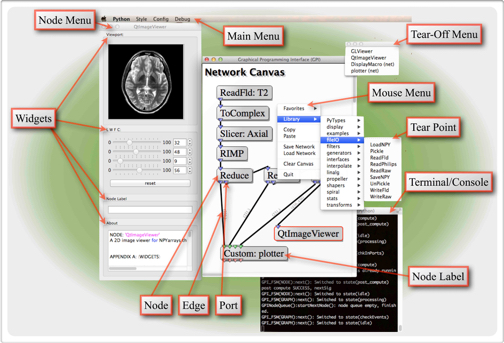
GPI stands for Graphical Programming Interface which is a development environment for scientific algorithms that provides a visual workspace for assembling algorithms. Algorithm elements (i.e. nodes) can be linked together to form a flow diagram. Each node is executed according to the hierarchy of the diagram.
Create a new conda environment for gpi:
conda create -n gpi python=3.9 fftw eigen qt compilers llvm-openmp -c conda-forge
conda activate gpi
Windows requires the MinGW-w64 GCC 13+ toolchain (for C++17 support in pybind11 nodes):
conda create -n gpi python=3.9 fftw eigen qt zlib gxx_win-64 distutils-activate-mingw -c conda-forge
conda activate gpi
Package notes:
gxx_win-64— provides MinGW-w64 GCC 13+ (C++17/C++20),gendef, anddlltoolneeded to build C/C++ extensionsdistutils-activate-mingw— configures Python'sdistutils/setuptoolsto use the MinGW compilerzlib— provideszlib.hrequired by some pybind11 nodes (cnpy.h)compilersandllvm-openmpare macOS/Linux packages and should not be used on Windows- pthreads are provided by the MinGW sysroot (no separate
pthreads-win32needed)
Install gpi from source:
git clone https://github.com/gpilab/framework.git gpi_source
cd gpi_source
pip install .
Build the core nodes:
gpi_initYou can now run gpi from your conda environment:
gpiTo build a node with C dependencies:
macOS / Linux:
cd /path/to/node
gpi_make --all
Windows:
cd C:\path\to\node
gpi_make
On Windows, gpi_make automatically passes --all via the gpi_make.cmd wrapper — no extra flags are needed. The MinGW-w64 toolchain (installed in the conda environment) is used to compile C/C++ extensions. If you encounter compiler errors on first run, re-run gpi_init to re-run the MinGW environment setup.