Text Positioning
Up to nine independent text groups can be positioned using options prefixed with text1 through text9. The old option names textxalign, textyalign, etc. are retained as aliases for text1xalign, text1yalign, etc. Similarly extratextxalign, extratextyalign, etc. are aliases for text2xalign, text2yalign, etc.
Note: Some encoders (e.g. EAN/UPC, ISBN, ISSN, ISMN) provide directly-positioned text where each character is placed by the encoder at a specific location relative to the bars. For this encoder-positioned text, the alignment, direction and offset options do not apply unless the text content is overridden using text1 (or alttext), which switches to the general text layout engine.
The textNxalign option is used to specify where to horizontally position the text for a given text group.
Values: offleft, left, center, right, offright, justify
Aliases: textxalign = text1xalign, extratextxalign = text2xalign
Data:    Test
Options: includetext alttext=Test layers=8 textxalign=offleft
Encoder: azteccode

Data:    Test
Options: includetext alttext=Test layers=8 textxalign=left
Encoder: azteccode

Data:    Test
Options: includetext alttext=Test layers=8 textxalign=center
Encoder: azteccode

Data:    Test
Options: includetext alttext=Test layers=8 textxalign=right
Encoder: azteccode

Data:    Test
Options: includetext alttext=Test layers=8 textxalign=offright
Encoder: azteccode

The textNyalign option is used to specify where to vertically position the text for a given text group.
Values: below, bottom, center, top, above
Aliases: textyalign = text1yalign, extratextyalign = text2yalign
Data:    Test
Options: includetext alttext=Test layers=8 textxalign=offright textyalign=below
Encoder: azteccode

Data:    Test
Options: includetext alttext=Test layers=8 textxalign=offright textyalign=bottom
Encoder: azteccode
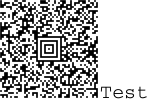
Data:    Test
Options: includetext alttext=Test layers=8 textxalign=offright textyalign=center
Encoder: azteccode

Data:    Test
Options: includetext alttext=Test layers=8 textxalign=offright textyalign=top
Encoder: azteccode

Data:    Test
Options: includetext alttext=Test layers=8 textxalign=offright textyalign=above
Encoder: azteccode

The textNdirection option is used to specify in which direction to orient text for a given text group.
Values: forward, backward, upward, downward
Aliases: textdirection = text1direction, extratextdirection = text2direction
Data:    Test
Options: includetext alttext=Test layers=8 textdirection=forward
Encoder: azteccode

Data:    Test
Options: includetext alttext=Test layers=8 textdirection=backward
Encoder: azteccode

Data:    Test
Options: includetext alttext=Test layers=8 textxalign=offright
         textyalign=center textdirection=upward
Encoder: azteccode

Data:    Test
Options: includetext alttext=Test layers=8 textxalign=offright
         textyalign=center textdirection=downward
Encoder: azteccode

The horizontal position of the text in points relative to the leftmost bar or modules.
Aliases: textxoffset = text1xoffset, extratextxoffset = text2xoffset
Data:    TEST
Options: includetext textxalign=center textxoffset=-40
Encoder: code39

The vertical position of the text in points relative to the base of the bars or modules.
Aliases: textyoffset = text1yoffset, extratextyoffset = text2yoffset
Data:    TEST
Options: includetext textyoffset=-20
Encoder: code39

- By default (in the absence of textxalign or textyalign), each character of text is placed immediately below the corresponding modules where this is possible.
- Where there isn't such a direct relationship then the default is to position the text centrally beneath the symbol.