Per-application volume control and OSD for Linux desktops.
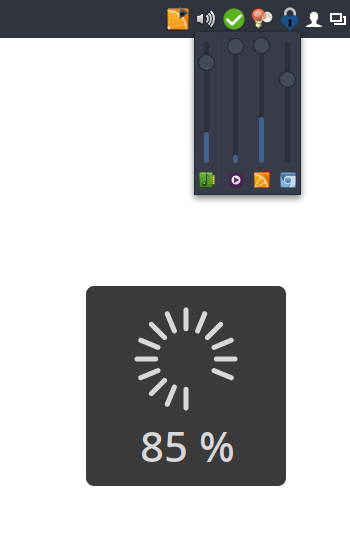
I couldn't find a simple tray icon that allows to control multiple applications easily from the task bar. So I wrote my own.
Bug reports and patches welcome!
It's not meant to be a replacement for a full-featured mixer application. If you're looking for that check out the excellent pavucontrol.
- Runs on virtually every desktop environment (via SNI)
- Control main volumes as well as individual applications
- Mute individual applications
- Shows application icons and names
- Per-application VU meter
- Click to open the mixer popup; right-click to open pavucontrol (or custom mixer application)
- Mouse-wheel support
- On-screen volume display (OSD)
- Supports X11 and Wayland
Available in AUR: volctl
Install from source using Cargo:
cargo install --git https://github.com/buzz/volctl.gitYou need to install the GSettings schema manually.
-
Clone this repository and build in release mode:
cargo build --release
-
Copy the binary to a location in your
$PATH:cp target/release/volctl ~/.local/bin/
You may also need to install the GSettings schema manually.
volctl uses GSettings to store preferences. The schema file must be installed for the settings to work. Copy the schema XML and compile the schemas:
PREFIX="${HOME}/.local"
mkdir -p "$PREFIX/share/glib-2.0/schemas/"
curl -fsSL https://raw.githubusercontent.com/buzz/volctl/main/data/apps.volctl.gschema.xml \
  -o "$PREFIX/share/glib-2.0/schemas/apps.volctl.gschema.xml"
glib-compile-schemas "$PREFIX/share/glib-2.0/schemas/"cargo runcargo clippy
cargo fmtThis is a Rust rewrite of the original Python version. The Python
implementation is still available on the legacy-python
branch.
GNU General Public License v3.0 or later