Transpiling ECMAScript2015 aka ES6 to ES5 with
Babelfrom a JS entry point file, then automatically export it into a distribution folder ready for production with NPM scripts
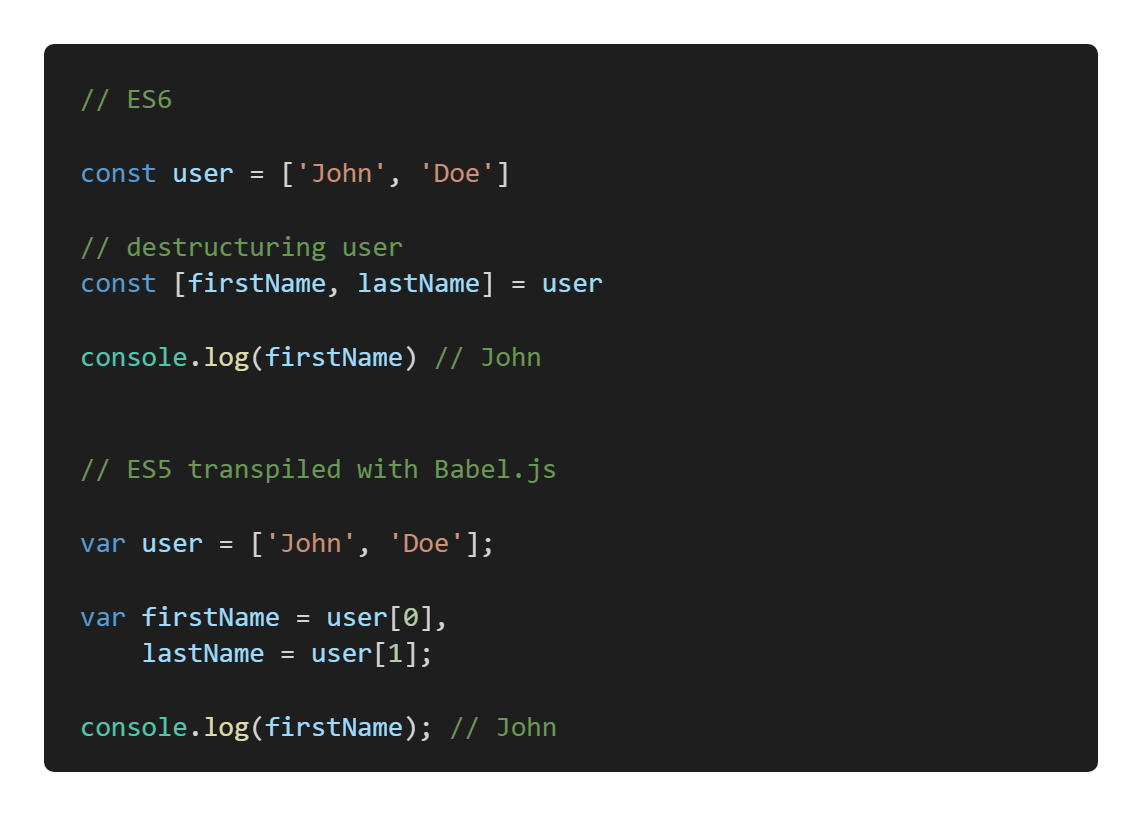
The technique called transpiling (transformation + compiling) is based on the usage of special tools to transform ES6 code into equivalent or close matches that works in ES5 environments.
This ready to go configuration is aimed to give the JavaScript developer the capability to quickly set up a Node.js environment and deliver ES5 from ES6 without wasting time in the maze of Babel configuration options and its plugins... It gives you the minimum settings to start a new project or evaluate any new ideas and it includes one HTML code base to fulfill this objective as well.
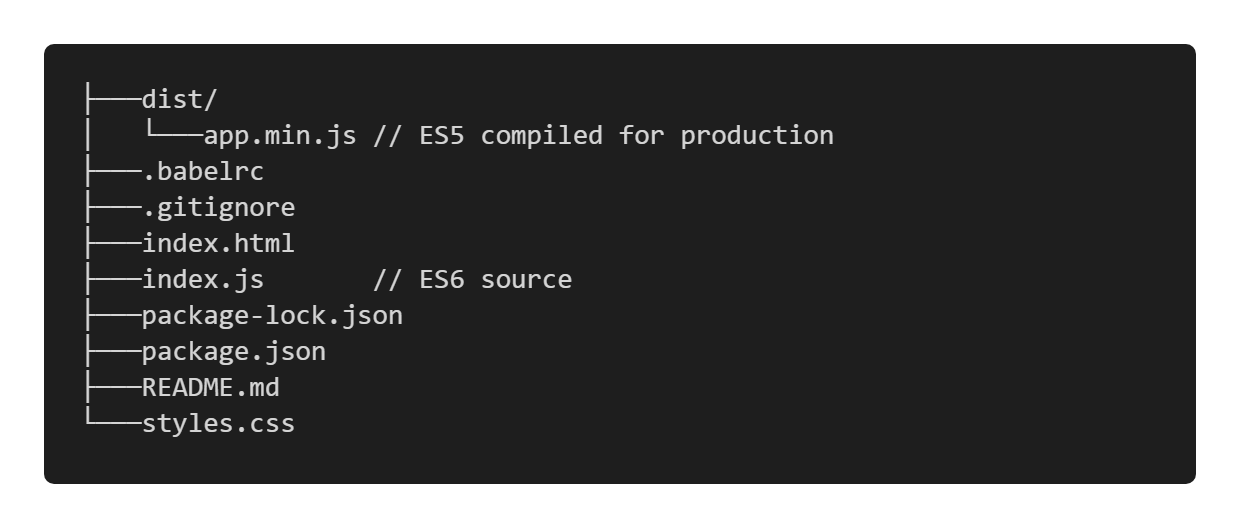
This configuration comes with :
package.jsonready to go file (see "installation" section)@babel/clito compile ES6 to ES5- minification with
babel-preset-minify-Babelpreset used via command line - soure map used as
@babel/clioption index.htmlsnippet file that imports.dist/app.jsor.dist/app.min.js.babelrcfile to hostBabelconfiguration :@babel/preset-envoption to compile for each environment that supports ES5commentsasbooleanoption to preserve JS comments in the output code fromBabel
- NPM scripts to :
- prebuild => create the projects structure
./dist,index.html,index.js,.babelrc(all files/folder are empty, see further) - clean:dist => clean/remove the
./distfolder and its content before eachBabelcompilation - build:dev => compile
index.jsto.dist/app.js(no minification, no source maps) - build:dev:watch => watch and compile
index.jsto.dist/app.js(no minification, no source maps) - build => compile
index.jsto.dist/app.jswith inline source maps (no minification) - build:minify => compile
index.jsto.dist/app.min.jswith inline source maps + minification
- prebuild => create the projects structure
Clone or download this repository locally then run:
$ npm installIt will install all the dependencies then you are ready to go...
Now you can write your ES6 JavaScript code into the provided index.js file and you have multiple NPM scripts to compile your code to ES5 depending of the evolution state of your project - development to production:
NPM script exemple:
$ npm run build:dev- this script will compile your code as raw ES5 and then export it into the
./distfolder as./dist/app.jswithout providing minification neither source maps (as discribed earlyer in the "Default Configuration" section of this page). All your JS comments are preserved (see further to remove JS comments for production).
NPM scripts:
- reading the
package.json"scripts" section can help you to understand the purpose of each script:
package.json
  //...
  "scripts": {
    "prebuild": "touch index.html && touch index.js && touch mkdir dist",
    "clean:dist": "rm -rf dist && mkdir dist",
    "build:dev": "npm run clean:dist && babel index.js --out-file dist/app.js",
    "build:dev:watch": "npm run clean:dist && babel index.js --out-file dist/app.js --watch",
    "build": "npm run clean:dist && babel index.js --out-file dist/app.js --source-maps inline",
    "build:minify": "npm run clean:dist && babel index.js --out-file dist/app.min.js --source-maps inline --presets minify"
  }
//...| NPM scripts | babel output | watch task | source maps* | minification | JS comments** |
|---|---|---|---|---|---|
build:dev |
dist/app.js |
false | false | false | true |
build:dev:watch |
dist/app.js |
true | false | false | true |
build |
dist/app.js |
false | true | false | true |
build:minify |
dist/app.min.js |
false | true | true | true |
Caution:
- running the
prebuildscript will overwrite theindex.htmlfile provided by default with the minimum required and necessary HTML tags to import your compiled JS file and run it in the broswer. - running
clean:distwill remove the./distfolder from your root directory.
Production import:
- the
build:minifyscript brings minification for production, it compiles and export your JS file asdist/app.min.js. In order to use it, you'll need to import it in theindex.htmllike so:
index.html
  //...
  <body>
-    <script src="./dist/app.js"></script>
+    <script src="./dist/app.min.js"></script>
  </body>
  //...
* source maps:
- note that the generated Source Map is included in the compiled file. If you need a separated file please refer to the Babel Source Map Documentation
** JS comments for production:
- by default, any JS comments in the output code from
Babelare preserved. If you want to remove them for production, you'll need to change the boolean value of the"comments"property into the.babelrcfile like so:
.babelrc
  {
    //...
-   "comments": true,
+   "comments": false,
    "presets": ["@babel/preset-env"]
    //...
}We use SemVer for versioning.
- Thomas G. aka Drozerah - Github
- Babel & preset-env
- Thanks to @lbonanomi for the
README.mdrevisions
ISC