xml, json, protobuf
graphql, rest, grpc
RESTful Web Services Cookbook 中文版
RESTful Web APIs
O'Reilly经典人气
- Google Cloud API Design Guide
- Microsoft REST API Guidelines
- GitHub API
- https://docs.github.com/en/rest?apiVersion=2022-11-28
- https://docs.github.com/en/rest/about-the-rest-api/api-versions?apiVersion=2022-11-28
- https://docs.github.com/zh/rest/using-the-rest-api/getting-started-with-the-rest-api?apiVersion=2022-11-28
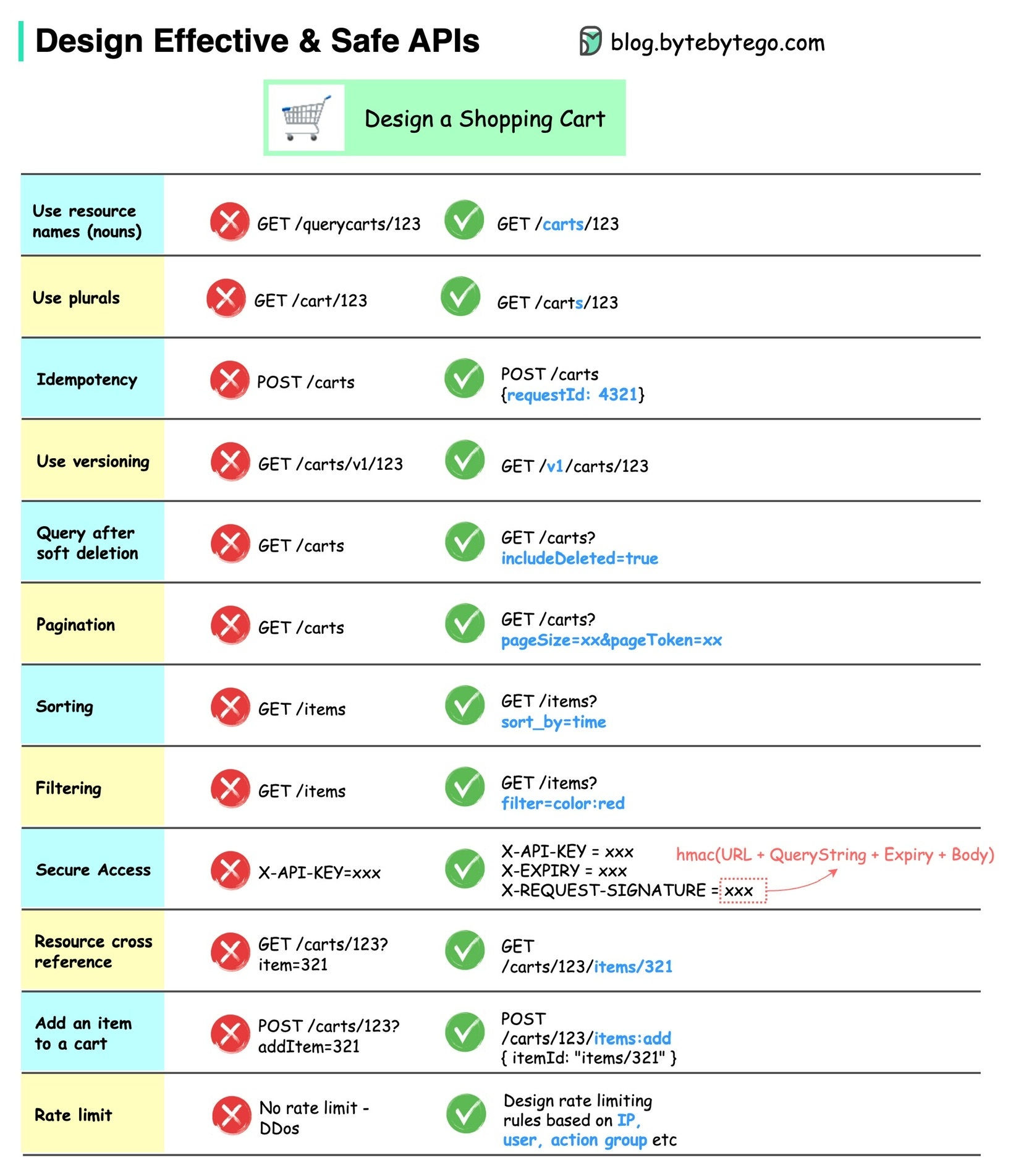
- 资源, resources
- 资源嵌套(resource cross references, nested resources)
- https://huggingface.github.io/text-embeddings-inference/
- https://api.smith.langchain.com/docs
- https://docs.stripe.com/api
- https://docs.digitalocean.com/reference/api/digitalocean
- https://developer.paypal.com/api/rest/current-resources/
- open/internal api
- public api
- private api
- monolithic
- Microservice
- Composite
- Unified
- REST
- RPC
- GraphQL
- soap
- REST(表述性状态转移, Representational State Transfer): 通过资源的表述改变本地应用状态
- 分布式应用架构风格
- 起源: HTTP object model
- 使用资源表述(API)实现web application状态转移
- 网页通过 REST-表述性状态转移 来工作的
- 设计目标: 性能(performance), 可扩展性(scalability), 简单性(simplicity), 可变性(modifiablity),可见性(visibility), 可移植性(portability), 可靠性(reliability).
- 设计风格:
- client-service architecture
- statelessness
- cacheability
- use of a layered system
- support for code on demand
- using a uniform interface
- RESTful: 遵循REST风格的Web Service
- REST 指的是一组架构约束条件和原则。满足这些约束条件和原则的应用程序或设计就是 RESTful。
- 资源(Resource): 用URL命名的事物, 使用URL标识一个网络中的资源.
- 每个URL标识一个资源.
- 表述(Represention): 发送请求所得到的响应, 一个文档.也称资源的表述(Represention of Resource)
- 每发送一条HTTP请求后, 就会收到对应的资源的表述.
- 客户端从来不会直接看到资源, 看到的都是资源的表述.
- 可寻址性原则: 每个资源都应该有一个属于自己的URL.
- HTTP方法
- GET: 请求提供资源的表述
- POST:
- 对现有资源的注解
- 发布消息
- 向数据处理流程提供数据块(如表单提交)
- 通过追加操作来扩充数据库
- 表单(form):
- 短会话(short session):
- 无状态性(statelessness): Server不会记住Client的状态.
- server不关心client的状态
- 默认属性
- RPC(远程过程调用, )
- 分布式应用架构风格
- URI(统一资源标识符, Uniform Resource Identifier)
- 用来表示一个地址或是一个名字
- URI是资源的标识符
- 大多数情况下, URI对客户端来说是模糊的(opaque)
- URL(统一资源定位器, Uniform Resource Locator)
- :////
- Resource(资源): 任意可以用URI来表示的东西
- HTML页面
- JSON
- XML
- 资源可以有一个或多个表述
- Represent(表述): 资源信息(状态, 数据或标记)的一种封装
- HTTP响应
- 状态码
- 消息体
- 报文头
- 应用状态(Application State):
- 每个表述都反应了应用程序中用户交互的状态
- 应用程序在请求前或响应后的状态, 每执行一次HTTP请求都应该会发生应用状态转移
- 用户所停留的页面
- 资源状态(Resource State):
- 从Server的角度看某个client的状态图
- 超媒体
- REST将超媒体作为应用状态的引擎
- Web应用
- Web服务
- 今天的Web早已不再仅仅是一个内容发布的平台,它已经发展成为了一个全球范围的计算平台。Web的消费者从以人类用户为主,发展到了人类用户(Web应用)和程序用户(Web服务)并重。而开发Web服务,最佳选择就是RESTful Web Services(REST风格的Web服务),基于SOAP/WSDL的旧式Web Services已经很少有人使用.
- Web API设计的最大挑战是:
- 消除 "理解文档的结构" 和 "理解文档的含义" 之间的语义鸿沟
- 约束带来解放, 自由带来混乱
- REST不是一种协议, 也不是一种文件格式, 更不是一种开发框架. 它是一系列约束的集合
x-api
The HTTP method of an endpoint defines the type of action it performs on a given resource. Some common HTTP methods are GET, POST, DELETE, and PATCH. The REST API reference documentation provides the HTTP method for every endpoint.
For example, the HTTP method for the "List repository issues" endpoint is GET."
Where possible, the GitHub REST API strives to use an appropriate HTTP method for each action.
GET: Used for retrieving resources.POST: Used for creating resources.PATCH: Used for updating properties of resources.PUT: Used for replacing resources or collections of resources.DELETE: Used for deleting resources.
https://learn.microsoft.com/en-us/graph/use-the-api
| Method | Description |
|---|---|
| GET | Read data from a resource. |
| POST | Create a new resource, or perform an action. |
| PATCH | Update a resource with new values, or upsert a resource (create if resource doesn't exist, update otherwise). |
| PUT | Replace a resource with a new one. |
| DELETE | Remove a resource. |
- For the CRUD methods
GETandDELETE, no request body is required. - The
POST,PATCH, andPUTmethods require a request body, usually specified in JSON format, that contains additional information, such as the values for properties of the resource.
- 使用下划线字段, json中, 这样和数据库的字段名更一致
POST /students/{student_id}/course-conflicts  # 检查冲突
POST /students/{student_id}/course/add  # 添加
POST /students/{student_id}/courses/{course_id}/grade  # 更新成绩

# action 使用单数+名词/动词
GET https://api.github.com/user/orgs
GET https://api.github.com/search/issues?q={query}{&page,per_page,sort,order}APP_ENV
# 子资源
/orders/{id}/cancel
/orders/{id}/pay
/users/{id}/reset-password
# 改状态 用更新来表达
• PATCH /users/{id}
• PATCH /orders/{id}{
"code" : 0,
"success": true,
"message" : "成功",
"data": {
"temporary_id":"12121"; //笔记临时id
}
}
// 错误返回示例
{
  "status_code": 404,
  "message": "Resource not found",
  "data": null,
  "error": {
    "error_code": "RESOURCE_NOT_FOUND",
    "error_message": "The requested resource does not exist"
  },
  "metadata": null
}
GET 	/device-management/devices : Get all devices
POST 	/device-management/devices : Create a new device
GET /device-management/devices/{id} : Get the device information identified by "id"
PUT 	/device-management/devices/{id} : Update the device information identified by "id"
DELETE /device-management/devices/{id} : Delete device by "id"推荐统一API, 设计时分两种场景, 如果 create严格则 只能更新, 如果创建不严格比如爬虫插入数据时则
如果严格区分
可以使用 参数显式指定, 或者使用单独的endpoint
PUT /v1/products/{id}?upsert=True  # 推荐

PUT /v1/products/{id}/upsert
PUT /v1/products/upsert

POST /v1/resources:upsert        # Google 明确语义为 upsert


# Upsert 用户
PUT /users/123?upsert=true
{
  "name": "Charlie"
}
-> 200 OK (更新) 或 201 Created (创建){
"request": {
"params": {}
},
"data": {
"name": "Furni",
"business_name": null,
"timezone": "America/Los_Angeles",
"timezone_switch_at": "2016-04-06T07:00:00Z",
"id": "18ce54ayf0z",
"created_at": "2016-04-07T14:40:15Z",
"salt": "b88939e5cabbca720159cb3659d73c06",
"updated_at": "2017-02-08T08:49:53Z",
"business_id": null,
"approval_status": "ACCEPTED",
"deleted": false
}
}// github 风格 https://docs.github.com/en/rest/overview/resources-in-the-rest-api
{
"code": "2000",
"message": "短信发送失败",
"errors":[
{
"resource": "Issue",
"field": "title",
"code": "missing_field"
}
],
}{
"eventTime": string,
"serviceContext": {
object (ServiceContext)
},
"message": string,
"context": {
object (ErrorContext)
}
}
| Fields | |
|---|---|
eventTime |
string (Timestamp format)Time when the event occurred as provided in the error report. If the report did not contain a timestamp, the time the error was received by the Error Reporting system is used.A timestamp in RFC3339 UTC "Zulu" format, with nanosecond resolution and up to nine fractional digits. Examples: "2014-10-02T15:01:23Z" and "2014-10-02T15:01:23.045123456Z". |
serviceContext |
object (ServiceContext)The ServiceContext for which this error was reported. |
message |
stringThe stack trace that was reported or logged by the service. |
context |
object (ErrorContext)Data about the context in which the error occurred. |
{
  "errors": [
    {
      "parameter": "start_time",
      "details": "invalid date",
      "code": "INVALID_PARAMETER",
      "value": "",
      "message": "Expected time, got \"\" for start_time"
    }
  ],
  "request": {
    "params": {
      "account_id": "hkk5"
    }
  }
}
In the above example, a request to an analytics endpoint was made with an invalid value for the start_time parameter. The errors/code for requests with invalid parameters is INVALID_PARAMETER.
| HTTP Code | Error Code |
|---|---|
| 403 | ACCOUNT_LOCKED_OUT |
| 404 | ACCOUNT_MEDIA_NOT_FOUND |
| 403 | ACCOUNT_NOT_FOUND |
| 403 | ACTION_NOT_ALLOWED |
| 404 | APP_EVENT_PROVIDER_CONFIGURATION_NOT_FOUND |
| 404 | APP_EVENT_TAG_NOT_FOUND |
| 404 | BEHAVIOR_OR_BEHAVIOR_EXPANDED_NOT_FOUND |
| 404 | CAMPAIGN_NOT_FOUND |
| 408 | CANCELLED_REQUEST |
| 404 | CARD_NOT_FOUND |
| 403 | CURRENT_USER_SUSPENDED |
| 400 | DUPLICATE_TWEET |
| 400 | EXCLUSIVE_PARAMETERS |
| 400 | FEATURE_NOT_AVAILABLE |
| 403 | FUNDING_INSTRUMENT_ACCESS_NOT_ALLOWED |
| 403 | FUNDING_INSTRUMENT_EXCEEDS_AVAILABLE_CREDIT_LIMIT |
| 404 | FUNDING_INSTRUMENT_NOT_FOUND |
| 403 | GENERIC_TWEET_ERROR |
| 400 | ILLEGAL_CHARACTERS |
| 400 | INCLUSIVE_PARAMETERS |
| 500 | INTERNAL_ERROR |
| 404 | INVALID_APP_ID |
| 404 | INVALID_APP_STORE |
| 400 | INVALID_DENOMINATION |
| 400 | INVALID_FUNDING_INSTRUMENT |
| 404 | INVALID_IAB_CATEGORY |
| 404 | INVALID_ID_ILLEGAL_CHARACTERS |
| 400 | INVALID_IMAGE |
| 400 | INVALID_MEDIA |
| 400 | INVALID_MEDIA_ID |
| 400 | INVALID_PARAMETER |
| 400 | INVALID_PLACEMENT_TYPE |
| 400 | INVALID_TAILORED_AUDIENCE_TYPE |
| 400 | INVALID_TARGETING_TYPE |
| 400 | INVALID_TIME_WINDOW |
| 400 | INVALID_TV_SHOW_LOCATIONS |
| 400 | INVALID_TWEET |
| 400 | INVALID_USER |
| 400 | INVALID_USER_ID |
| 423 | LOCK_ACQUISITION_TIMEOUT |
| 404 | LINE_ITEM_APP_NOT_FOUND |
| 404 | LINE_ITEM_NOT_FOUND |
| 404 | MACT_APP_NOT_FOUND |
| 403 | MALWARE_STATUS |
| 404 | MEDIA_CREATIVE_NOT_FOUND |
| 404 | MEDIA_NOT_FOUND |
| 405 | METHOD_NOT_ALLOWED |
| 400 | MISSING_PARAMETER |
| 404 | NO_PROVIDER_AVAILABLE_FOR_THIS_CLIENT_APPLICATION |
| 404 | NOT_FOUND |
| 404 | PROMOTABLE_USER_NOT_FOUND |
| 404 | PROMOTED_ACCOUNT_NOT_FOUND |
| 404 | PROMOTED_TWEET_NOT_FOUND |
| 403 | READONLY_CLIENT_APPLICATION |
| 400 | REQUEST_TOO_COMPLEX |
| 404 | ROUTE_NOT_FOUND |
| 503 | SERVICE_UNAVAILABLE |
| 503 | OVER_CAPACITY |
| 400 | SPEND_EXCEEDS_BUDGET |
| 404 | TAILORED_AUDIENCE_CHANGE_FILE_NOT_FOUND |
| 404 | TAILORED_AUDIENCE_NOT_FOUND |
| 404 | TAILORED_AUDIENCE_OR_TAILORED_AUDIENCE_EXPANDED_NOT_FOUND |
| 404 | TARGETING_CRITERION_NOT_FOUND |
| 400 | TOO_MANY_CAMPAIGNS |
| 400 | TOO_MANY_LINE_ITEMS |
| 429 | TOO_MANY_REQUESTS |
| 400 | TV_SHOW_OUTSIDE_MARKET |
| 400 | TWEET_CANNOT_BE_BLANK |
| 403 | TWEET_IS_SPAM |
| 404 | TWEET_NOT_FOUND |
| 429 | TWEET_RATE_LIMIT_EXCEEDED |
| 401 | UNAUTHORIZED_ACCESS |
| 403 | UNAUTHORIZED_CLIENT_APPLICATION |
| 400 | UNKNOWN_CARD_TYPE |
| 400 | UNKNOWN_CRITERIA_TYPE |
| 403 | USER_NOT_FOUND |
| 404 | WEB_EVENT_TAG_NOT_FOUND |
{
    "error": {
        "code": 503,
        "message": "No capacity available for model gemini-3-pro-high on the server",
        "status": "UNAVAILABLE",
        "details": [
            {
                "@type": "type.googleapis.com/google,rpc.Errorinfo",
                "reason": "MODEL CAPACITY EXHAUSTED",
                "domain": "cloudcode-pa.googleapis.com",
                "metadata": {
                    "model": "gemini-3-pro-high"
                }
            },
            {
                "@type": "type.googleapis.com/google.rpc.Retrylnfo",
                "retryDelay": "39s"
            }
        ]
    }
}