A powerful Telegram bot that provides instant token information and bubble maps visualization from BubbleMaps. Get real-time access to token ownership distribution, market data, and decentralization metrics directly in Telegram, for both private chats and communities.



- 🔍 One-click token lookup by pasting any contract address directly in chat
- 🔄 Automatic blockchain detection across all supported networks
- 📊 Real-time market data integration (price, volume, market cap, 24h change)
- 📈 Decentralization score and metrics visualization
- 👥 Detailed top holders identification and distribution analysis
- 🖼️ Token ownership visualization with interactive bubble maps
- 🌐 Multi-chain support with seamless cross-chain analysis
- 👥 Bot can be setup in community chats for group token analysis
- 📊 Community statistics for tracking popular tokens and chains
- 🔥 Trending tokens analytics for the last 3 days
- 👍👎 Community rating system with like/dislike functionality
- 🏆 Top rated tokens by community voting
- 📣 Mass message broadcasting system for announcements
- ⭐️ Favorites system to save and quickly access tokens
- 🕒 Recently viewed tokens history
- 📱 Intuitive Telegram interface with seamless navigation
- 🚀 Optimized performance for faster token lookups
- 🔒 Comprehensive admin dashboard with usage statistics
- 📋 User management tools
- 📝 Detailed logging system for monitoring bot activity
Watch our demo video to see the BubbleMaps Telegram Bot in action:
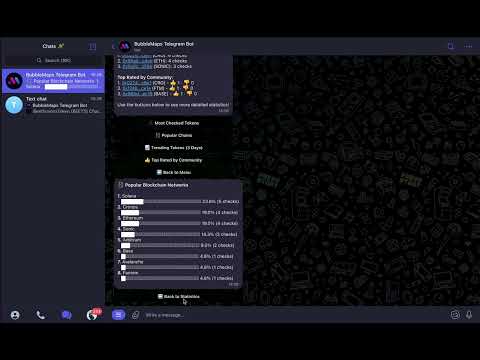
Click the image above to watch the demo on YouTube.
- Ethereum (ETH) - Auto-detected
- BNB Smart Chain (BSC) - Auto-detected
- Fantom (FTM) - Auto-detected
- Avalanche (AVAX) - Auto-detected
- Cronos (CRO) - Auto-detected
- Arbitrum (ARBI) - Auto-detected
- Polygon (POLY) - Auto-detected
- Base (BASE) - Auto-detected
- Solana (SOL) - Auto-detected
- Sonic (SONIC) - Auto-detected
- Find the Bot on Telegram: BubbleMaps Telegram Bot
- Start a Chat: Click "Start" to initiate the bot
- Check a Token: Paste any contract address to get instant analysis
- Node.js 16+
- MongoDB 4.4+
- Telegram Bot Token (from @BotFather)
- Clone the repository:
git clone https://github.com/incryptomax/bubblemapstelegrambot.git
cd bubblemapstelegrambot- Install dependencies:
npm install
npx playwright install chromium- Configure environment:
cp .env.example .env
# Edit .env with your settings- Start the bot:
npm startDeploy using Docker Compose:
# Build and start services
docker-compose up -d

# View logs
docker-compose logs -f bot

# Stop services
docker-compose downTELEGRAM_BOT_TOKEN= # Your Telegram bot token from @BotFather
MONGODB_URI= # MongoDB connection URI
ADMIN_USER_IDS= # Comma-separated Telegram user IDs for admin accessLOG_LEVEL=info # Logging level (debug, info, warn, error)
PLAYWRIGHT_TIMEOUT=60000 # Screenshot timeout (ms)
NAVIGATION_TIMEOUT=120000 # Page navigation timeout (ms)
STABILIZATION_TIME=25000 # Page stabilization wait time (ms)The bot is designed to be simple and intuitive:
- Direct Contract Input: Paste any contract address directly in the chat
- Command: Use the
/check <address>command - Button Interface: Click the "Check a token" button and follow the prompts
- Community Statistics: Use
/topstatto view popular tokens and trends - User Features: Access
/favoritesand/recentto manage your token history
User Commands
/start- Initialize the bot and display main menu/help- Display command list and usage instructions/check <address>- Analyze token by contract address/favorites- View and manage your saved tokens/recent- View your recently checked tokens history/topstat- Access community token statistics and trends
Admin Commands
/stats- View detailed usage statistics and metrics/broadcast- Send a message to all bot users
Adding the BubbleMaps Telegram Bot to your community enhances your group's capabilities for on-chain token analysis.
-
Search for the Bot:
- Search for @bubblemapstelegrambot in Telegram
-
Add to Group:
- Start a chat with the bot and click the three dots (⋮) in the top right
- Select "Add to Group" or "Add to Channel"
- Choose your community from the list
For optimal functionality, ensure the bot has these permissions:
- ✅ Send Messages
- ✅ Send Media
- ✅ Send Stickers & GIFs
- ✅ Embed Links
- Automatic Token Analysis: Members can paste any contract address for instant analysis
- Blockchain Auto-Detection: No need to specify which network the token is on
- Visual Representation: Get bubble map screenshots directly in the group chat
- Deep-Link Integration: "Check more details" button for private analysis with the bot
The bot features a comprehensive logging system:
- DEBUG: Detailed diagnostic information for development
- INFO: General operational information about normal system activity
- WARN: Warning conditions that might require attention
- ERROR: Error conditions preventing normal operations
logs/
  ├── combined.log     # All log entries
  ├── error.log        # Error-level entries only
  ├── debug-YYYY-MM-DD.log  # Daily rotated debug logs
  └── exceptions.log   # Uncaught exceptions
.
├── config/         # Configuration files
├── src/
│   ├── handlers/   # Command and callback handlers
│   ├── models/     # Database models
│   ├── services/   # Business logic and API integrations
│   ├── utils/      # Utility modules
│   └── assets/     # Static assets for the bot
├── logs/           # Application logs
├── screenshots/    # Generated screenshots for tokens
├── Dockerfile      # Docker configuration
├── docker-compose.yml # Docker Compose configuration
└── package.json    # Project metadata and dependencies
This project is licensed under the MIT License. See the LICENSE file for details.
- BubbleMaps for the token visualization data
- CoinGecko for market data integration
- Playwright for reliable web automation
- Telegraf for the Telegram Bot framework